AppleFoundationModelChatbot
Sharing functionality with devices

Update AppIntent
import SwiftUI
import AppIntents

struct SendToChatbotIntent: AppIntent {

    static let title: LocalizedStringResource = "Send to Chatbot"

    static let description = IntentDescription("Testing")

    static let openAppWhenRun: Bool = false

    @Parameter(title: "To Chatbot", requestValueDialog: "What to send?")
    var target: String

    @Parameter(title: "Context", requestValueDialog: "Provide context (optional)")
    var context: String

    @MainActor
    func perform() async throws -> some IntentResult & ReturnsValue<String> {
        if context == "NewConversation" {
            AppleFoundationModelViewModel.shared.resetSession()
        }
        let combinedPrompt = context.isEmpty ? target : "\(target)\nContext: \(context)"
        let answer = await AppleFoundationModelViewModel.shared.ask(prompt: combinedPrompt) ?? "No response"
        return .result(value: answer)
    }
}
Modification to our SendToChatbotIntent from the previous post:
-
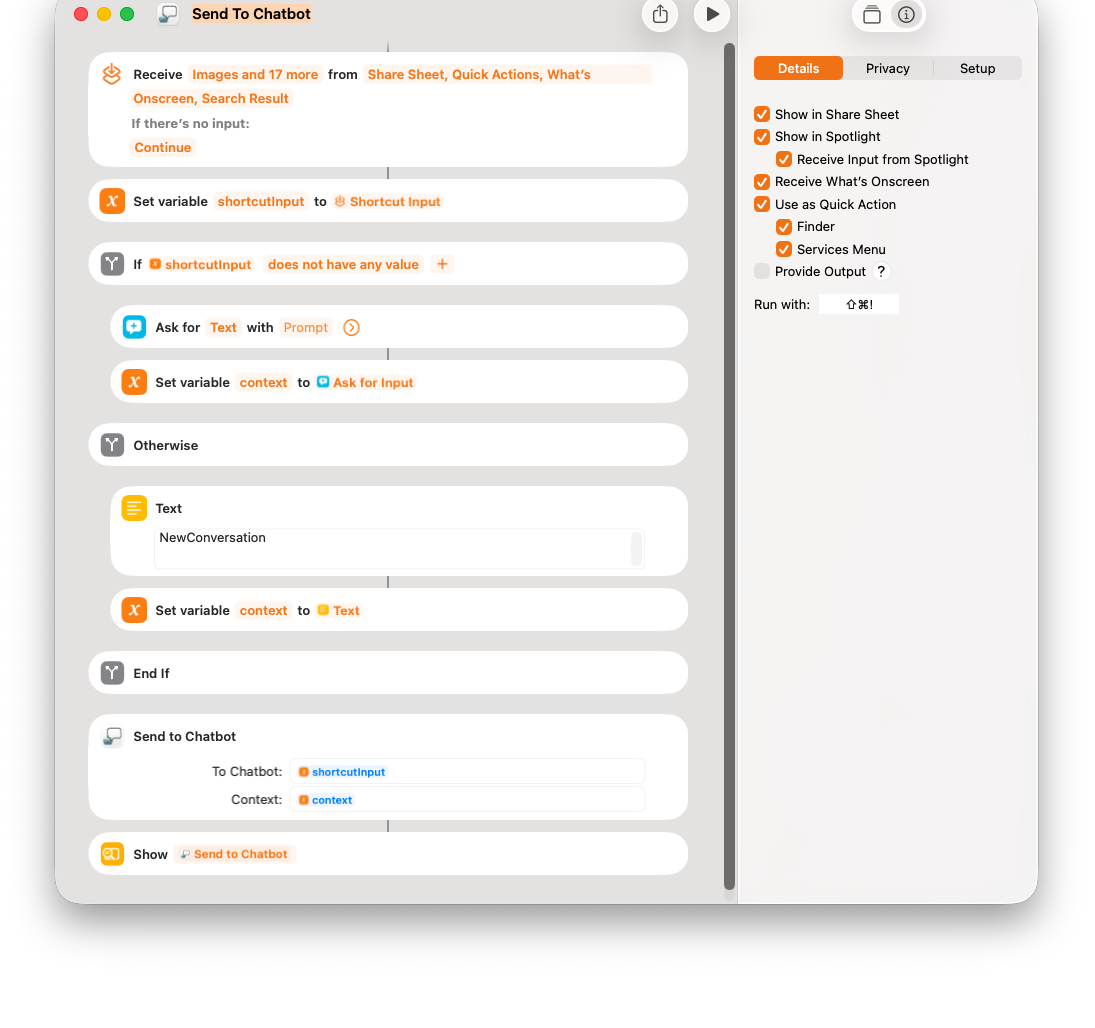
Our app-intent now expects to receive 2 inputs: 1) the prompt to our Chatbot; and 2) the context of the conversation.
-
The conversation with chatbot continue. This allows you to send more queries to chatbot regard the most recent input
-
We start a new conversation when sending new input the chatbot. This is done by setting
contexttoNewConversatin.
Apple Shortcuts
Source Code
You can find project source code here:
https://github.com/RMIT-Ace/AppleFoundationModelChatbot