SolarSysCodeAlong
RealityKit Code Along - Animation with ECS
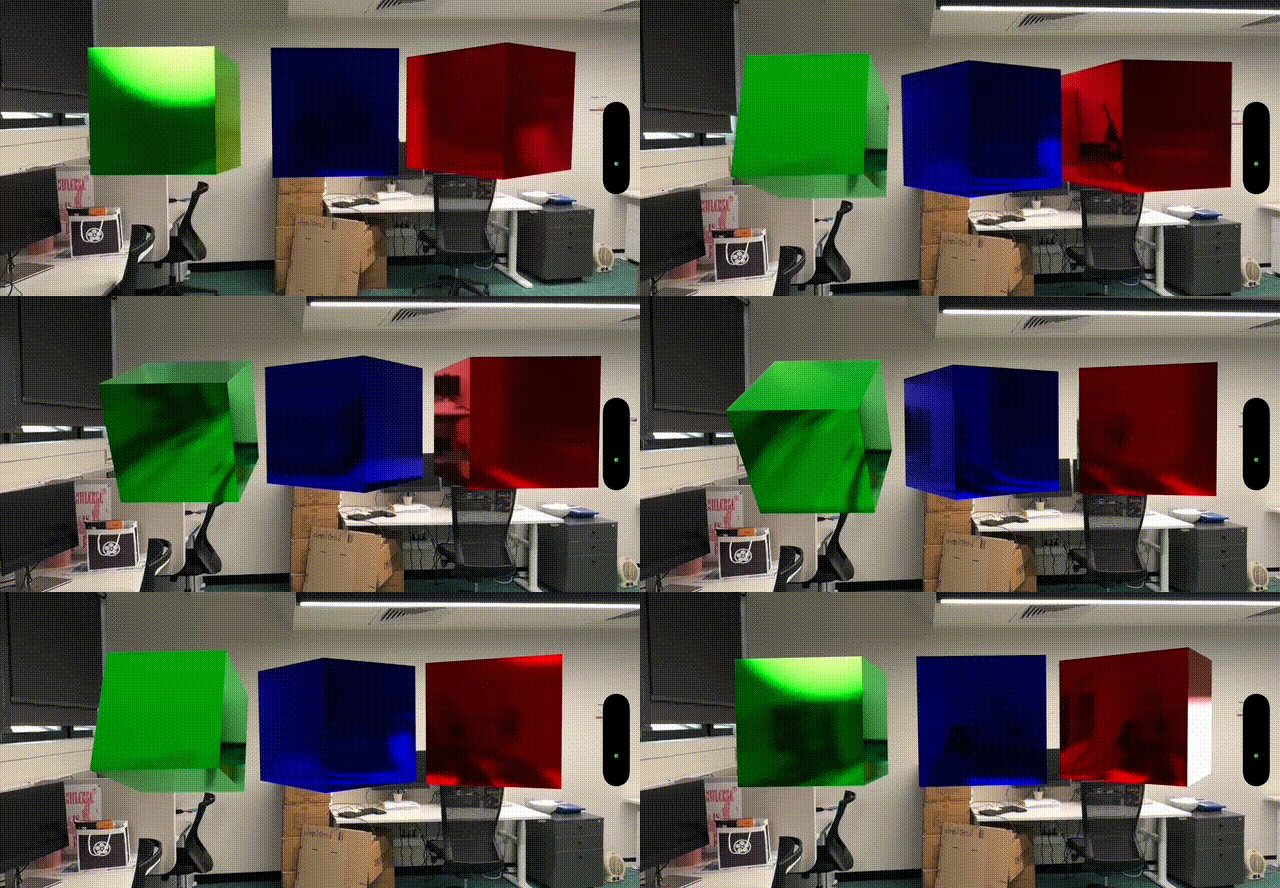
In this post, we’re continuing to implement 3D animation with RealityKit. This time we’ll explore the suggested framework using Entity, Component and System.
Source Branches
https://github.com/RMIT-Ace/SolarSysCodeAlong
In this post, we will be working on these branches:
02-ECS1
ECS - Component
In RealityKit, components store information for entities. We can use a component to manage per-entity state that systems can use. For instance, we’ll use a component to store rotational operation details (rotation speed and axis of revolution)l for each entity.
struct RotationComponent: Component {
    var rotationSpeed: Float = 0.0
    var rotationAxis: SIMD3<Float> = [0, 1, 0]
}
ECS - System
In RealityKit, a system represents a continuous operation affecting multiple entities. Its code is executed on every scene’s update. RealityKit calls the system’s update function as often as specified by the updatingSystemWhen parameter in the entities(matching:updatingSystemWhen:) function. This eliminates the need to set up and manage the runloop for updating animations.
We can simply focus our code on implementing rotational operations for our entities.
struct RotationSystem: System {
    static let query = EntityQuery(where: .has(RotationComponent.self))

    init(scene: Scene) { }

    func update(context: SceneUpdateContext) {
        for entity in context.scene.performQuery(Self.query) {
            guard let rotationComponent = entity.components[RotationComponent.self] else { continue }

            let rotationAngle = rotationComponent.rotationSpeed * Float(context.deltaTime)
            let rotation = simd_quatf(angle: rotationAngle, axis: rotationComponent.rotationAxis)
            entity.transform.rotation *= rotation
        }
    }
}
As mentioned, the update() function affects all entities in the current scene. In this example, we’re ignoring all other entities except those with a RotationComponent.
    static let query = EntityQuery(where: .has(RotationComponent.self))
    ...
    func update(context: SceneUpdateContext) {
        for entity in context.scene.performQuery(Self.query) {
            ...
        }
    }
Next, we’ll retrieve information about the entity’s rotation.
guard let rotationComponent = entity.components[RotationComponent.self] else { continue }
Since we no longer control how often our code is called per second, RealityKit provides deltaTime. This records the time elapsed since our function was last called. We’ll use deltaTime to fine-tune our rotational operation.
In our case, the amount of rotation angle since last update is calcuated as:
let rotationAngle = rotationComponent.rotationSpeed * Float(context.deltaTimeo)
let rotation = simd_quatf(angle: rotationAngle, axis: rotationComponent.rotationAxis)
And, lastly, we update our component with the new rotation value.
entity.transform.rotation *= rotation
Using ECS
The entity part of the code remains unchanged. However, I’ve refactored it into a function called makeBoxEntity() to avoid repetitive code for creating multiple entities.
var body: some View {
        RealityView { content in
            ...
            let blueBox = makeBoxEntity(name: "BlueBox",
                                        color: .blue,
                                        position: [0, 0, depth])
            content.add(blueBox)
            ...
        }
}
To make our RotationSystem code operates on an entity, you can simply do:
blueBox
    .components
    .set(RotationComponent(rotationSpeed: 10.0, rotationAxis: [0, -1, 0]))
Finally, you need to inform RealityKit about the new system RotationSystem so it can call it whenever the scene updates. This only needs to be done once per app run.
var body: some View {
        RealityView { content in
            ...
        }
        .onAppear(){
            RotationSystem.registerSystem()
        }
}
View the complete source code from the GitHub branch 02-ECS1. Build and run it on your device to see how easily each code component can be reused. For example, you can create three boxes and make them rotate independently.